变量提示词#
我的变量提示词方案已经在变量提示词: 让 AI 理解变量中详细介绍了, 此处只列举一些杂七杂八甚至可能过时了的内容.
这些都只是提示词, 写法只取决于你的想象. 以下只是给你一个概念, 请不要照抄.
这些都只是提示词, 写法只取决于你的想象. 以下只是给你一个概念, 请不要照抄.
这些都只是提示词, 写法只取决于你的想象. 以下只是给你一个概念, 请不要照抄.
我的过时变量角色卡#
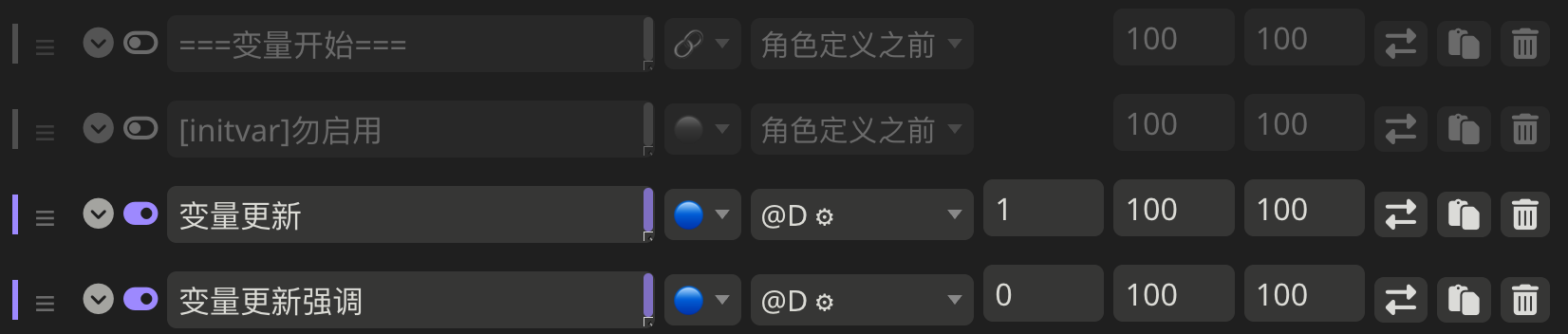
我每张卡其实都使用了不同的变量提示词写法:
所有变量提示词都在 D1
补充一个 D0 recall 来稳定格式
变量更新规则和输出格式在 D4
当前变量情况在 D1
补充一个 D0 recall 来稳定格式
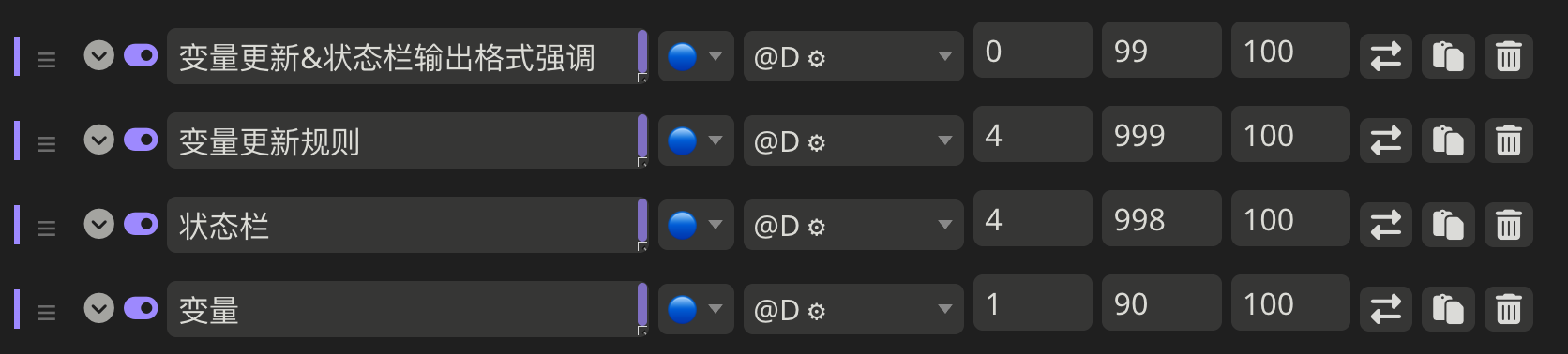
当前变量情况在 D4, 角色变量常驻而任务系统变量仅在心爱、一果在场时发送
变量更新规则也在 D4, 和当前变量情况放在一起
常驻变量的更新规则由 check list 给出
任务系统变量的更新规则仅在 check list 中要求
参考任务系统输出的<TaskPrompt>来更新; 而任务系统会根据剧情在正文中插入<TaskPrompt>来提示任务完成、获得积分等
输出格式在 D0 中给出
变量分析思维链#
思维链或者所有提示词怎么写完全由你自己说了算, 你也许会得到:
不为变量编写任何 check 规则, 而是直接让 AI 自己搞定:
<UpdateVariable>
<Analysis>$(IN ENGLISH, no more than 80 words)
- ${calculate time passed: ...}
- ${decide whether dramatic updates are allowed as it's in a special case or the time passed is more than usual: yes or no}
- ${what variables should be updated, accoring only to current reply instead of previous plots: ...}
</Analysis>
<JSONPatch>
[
  { "op": "replace", "path": "${/path/to/variable}", "value": "${new_value}" },
  { "op": "delta", "path": "${/path/to/number/variable}", "value": "${positive_or_negative_delta}" },
  { "op": "insert", "path": "${/path/to/object/new_key}", "value": "${new_value}" },
  { "op": "remove", "path": "${/path/to/array/0}" },
  ...
]
</JSONPatch>
</UpdateVariable>
变量很少, 没必要单独写变量更新规则, 直接在思维链里列举它们该如何更新:
<UpdateVariable>
<Analysis>$(IN ENGLISH, no more than 80 words)
- ${calculate time passed: ...}
- ${decide whether dramatic updates are allowed as it's in a special case or the time passed is more than usual: yes or no}
- ${update variables suffixed with '次数' when a corresponding event occurs but don't update them any more during that event: ...}
- ${update variables suffixed with '好感度' according to characters' attitudes towards <user>'s behavior respectively only if they're currently aware of it (±(3~6); but '好感度' must be capped in 0~100 and remains unchange when it's 100): ...}
- ${switch variables suffixed with '处女', '受孕' or '被<user>接受感情' between '是' and '否': ...}
</Analysis>
<JSONPatch>
[
  { "op": "replace", "path": "${/path/to/variable}", "value": "${new_value}" },
  { "op": "delta", "path": "${/path/to/number/variable}", "value": "${positive_or_negative_delta}" },
  { "op": "insert", "path": "${/path/to/object/new_key}", "value": "${new_value}" },
  { "op": "remove", "path": "${/path/to/array/0}" },
  ...
]
</JSONPatch>
</UpdateVariable>
在思维链中让 AI 回忆 check 规则, 据此分析该如何更新变量:
<UpdateVariable>
<Analysis>$(IN ENGLISH, no more than 80 words)
- ${calculate time passed: ...}
- ${decide whether dramatic updates are allowed as it's in a special case or the time passed is more than usual: yes or no}
- ${analyze every variable based on its corresponding `check`, according only to current reply instead of previous plots: ...}
</Analysis>
<JSONPatch>
[
  { "op": "replace", "path": "${/path/to/variable}", "value": "${new_value}" },
  { "op": "delta", "path": "${/path/to/number/variable}", "value": "${positive_or_negative_delta}" },
  { "op": "insert", "path": "${/path/to/object/new_key}", "value": "${new_value}" },
  { "op": "remove", "path": "${/path/to/array/0}" },
  ...
]
</JSONPatch>
</UpdateVariable>
在思维链中不是让 AI 回忆 check, 而是让它原封不动地列举所有 check 内容, 再进行分析:
<UpdateVariable>
<Analysis>$(IN ENGLISH, no more than 80 words)
- ${calculate time passed: ...}
- ${decide whether dramatic updates are allowed as it's in a special case or the time passed is more than usual: yes or no}
- ${list every item in every `check` of `变量更新规则` document before actual variable analysis: ...}
  - ${analyze corresponding variables that are based on this item, according only to current reply instead of previous plots: ...}
</Analysis>
<JSONPatch>
[
  { "op": "replace", "path": "${/path/to/variable}", "value": "${new_value}" },
  { "op": "delta", "path": "${/path/to/number/variable}", "value": "${positive_or_negative_delta}" },
  { "op": "insert", "path": "${/path/to/object/new_key}", "value": "${new_value}" },
  { "op": "remove", "path": "${/path/to/array/0}" },
  ...
]
</JSONPatch>
</UpdateVariable>
依次检查型中 "列举 check" 和 "基于 check 进行分析" 两个要求放置地过于紧密, AI 可能偷懒. 你可以将这两句话隔离一下:
<UpdateVariable>
${display every `check` in `变量更新规则` document before actual variable analysis}
<Analysis>$(IN ENGLISH, no more than 80 words)
- ${calculate time passed: ...}
- ${decide whether dramatic updates are allowed as it's in a special case or the time passed is more than usual: yes or no}
- ${analyze variables based on `check`, according only to current reply instead of previous plots: ...}
</Analysis>
<JSONPatch>
[
  { "op": "replace", "path": "${/path/to/variable}", "value": "${new_value}" },
  { "op": "delta", "path": "${/path/to/number/variable}", "value": "${positive_or_negative_delta}" },
  { "op": "insert", "path": "${/path/to/object/new_key}", "value": "${new_value}" },
  { "op": "remove", "path": "${/path/to/array/0}" },
  ...
]
</JSONPatch>
</UpdateVariable>
此外, 变量更新格式说白了也是额外输出格式, 因此完全可以放在更次要的位置而在 D1/D0 用变量更新格式强调来保证 AI 输出.